

Appearance
Run it in Spectrum
Save the project
Choose File > Save Project (Ctrl+S).
Saving is all it takes. There is no separate publish step: the moment Nexus accepts the save, the project is live, and any browser already showing it reloads with your changes.
Open it in a browser
On any machine that can reach Nexus, open:
https://<nexus-host>:8443/projectsFind the Tutorial card and click Open.
The project opens in a new tab and goes to its first page, /runtime/Tutorial/overview, showing the Overview view. On a new Nexus anyone can read tags without signing in, so it shows live values straight away. On a Nexus where tag reads need an account, Spectrum asks you to sign in first.
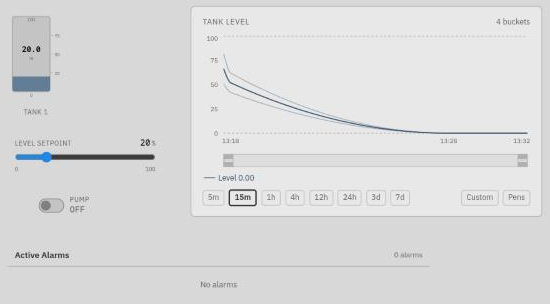 The Overview in Spectrum.
This is Spectrum, the operator runtime. It is a web page served by Nexus; there is nothing to install on the machine that shows it. A plant-floor panel runs the same page full-screen in Lens.
Try it
Drag the slider. The tank follows. The slider wrote the new value to [DEFAULT]Tank/Level in Nexus, and the tank, bound to the same tag, shows what Nexus now holds.
Drag it above 70. A Tank level high alarm appears in the alarm table within a few seconds. Drag it back below 70 and the alarm clears.
![Spectrum with the level at 82%, and the alarm table listing a high Tank level high alarm on [DEFAULT]Tank/Level, unacknowledged](/manual/img/tutorial/tutorial-spectrum-alarm.png) Above 70, the alarm appears.
Above 70, the alarm appears.
Watch the trend. Every change you make is recorded, so the trend draws the path the level took.
Not every component is instant
The tank, slider and toggle update the moment a value changes. The alarm table and the trend refresh on a timer instead: every 10 and 30 seconds by default. Each has a Refresh Interval property if you want it faster.
Click the pump toggle. It switches, and it stays switched: the value lives in Nexus, not in the browser.
Open a second browser tab on the same project. Both show the same values, and a change made in either appears in both. Every operator sees the plant the same way.
Change something in Studio. Move a component, or change the tank's Label, and save. Spectrum reloads with the change, without anyone refreshing the page.
What you built
| Piece | What it showed you |
|---|---|
| Memory tags | Nexus holds values; screens read and write them. |
| History | Nexus records a tag's values when history is enabled on it. |
| An alarm | Alarms are set on the tag, not on the screen, so every screen and notification sees the same alarm. |
| Bindings | A component shows a tag through a binding; a bidirectional binding also writes to it. |
| Saving | Saving publishes. Operators get changes live. |
Where to go next
- Connect real equipment. Add a device and create device tags from it — see Devices and drivers. Point the tank at a device tag instead of the memory tag and the screen works unchanged.
- Tell someone when the alarm fires. Set up email, SMS or voice in Alarm notification.
- Back it up. See Backup and restore before the project matters to anyone.